How to take better feet photos with your phone: light, angles, sets and the edits that are allowed
Most feet photos fail on light, shake and clutter, not on the camera. How to use a window, hold the phone still, pick angles that stay inside the rules, build a set the feed shows well, edit without crossing the line on AI, and check a photo before you upload it.
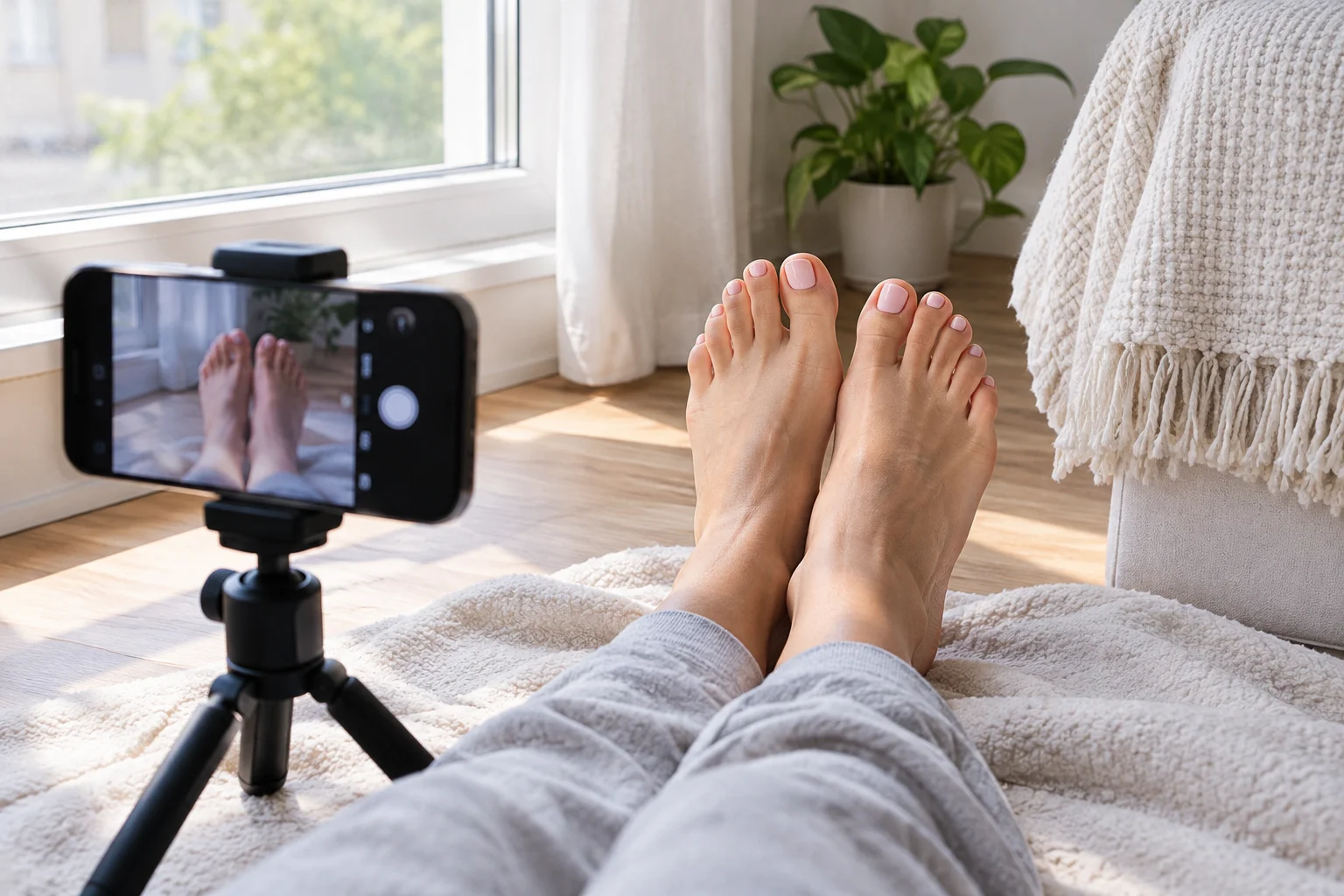
Open the live feed and the difference between galleries is rarely the camera. It is the light, whether the phone was still, and what else was in the frame. A four-year-old phone by a window beats the newest one under a ceiling bulb almost every time.
This post is about getting the most out of the phone you already have: light, focus, angles that work for feet, how to build a set that looks right on the feed, where editing stops being editing, and a short check before you upload. The seller toolkit covers gear, for when you want some.
Light first, always
Soft, even daylight makes every other decision easier. It shows skin and nail colour as they are.
- Face the window. Sit or lie with your feet pointing at the window, a metre or two back from it. Light coming from behind the camera towards your feet is the simplest set-up there is.
- Overcast beats sun. Direct sun throws hard shadows and burns out the top of the foot. A cloudy day, or a window that gets no direct sun, is better.
- Room lights off. Daylight is blue-white and bulbs are orange, so a photo lit by both has skin that is two colours at once.
- Never the flash. It flattens the foot and leaves shiny patches on skin and nails.
- Evenings need their own light. A dimmable ring light at table height gives the same even light as a window. The toolkit says what to look for.
Hold still and get the focus right
Blur is the most common fault in uploaded photos, and it almost never comes from the camera.
- Wipe the lens before every session. A greasy lens puts a haze over everything.
- Use the main rear camera, in the normal photo mode. Portrait mode softens the edges of toes.
- Tap to focus on the toes. Otherwise the camera focuses on whatever is biggest, often the floor. A finger held on the screen locks focus and exposure, and the slider that appears lets you darken the shot a little, which keeps skin from washing out.
- Prop or mount the phone. A tripod with a ten-second timer means no hand shake and the same framing across a whole set.
- Step back and zoom. If your phone has a 2x or 3x lens, use it from further away. The 1x lens up close stretches whatever is nearest to it, so toes look longer and the heel smaller than they are.
Shoot at your camera's normal resolution. A photo here is stored at up to 2,560 pixels on its long side, plenty for zooming in the gallery, so a sharp original matters.
Angles that work for feet
| Angle | What it shows | Watch out for |
|---|---|---|
| Floor level, soles towards the camera | Soles, toes, the whole shape | Legs rising into the frame: everything above the lower legs fully clothed, nothing underwear-focused |
| Side on, low | The arch, the heel, the line of the ankle | A relaxed foot flattens the arch; point the toes a little |
| Straight down from above | Toes and nails, footwear from the top | Your own shadow; stand so the light comes from the side |
| Three-quarter view, slightly raised | The most natural look, what a person standing nearby sees | Clutter, because this angle sees most of the room |
| Close, with the 2x lens | Nail detail, skin texture, a toe ring | Shake; use the tripod or the timer |
The Content Rules decide the frame: your own feet, ankles and lower legs, bare or in footwear, hosiery or everyday clothing. Your face may appear or not. Anything else in the picture must be fully clothed, no framing may show the crotch or focus on underwear, and there are no trampling, pain or domination set-ups. Shooting from the floor up is where this goes wrong by accident, so check the frame before the pose.
Build a set, not a photo
One upload is one post, and the post is what buyers see on the feed. Five to ten photos around one idea do more for you than ten unrelated pictures.
- One idea per set. One pair of socks, one nail colour, one setting. The variety comes from distance and angle: a wide shot of the whole scene, two or three mid-distance frames, one or two close-ups.
- Order matters. Photos keep the order you selected them in, and the feed card shows the first four, so put the strongest wide shot first. In a mixed upload, photos go before videos.
- Think in squares. The feed card and your Media tab show a square crop of each photo; the full picture opens when a buyer taps it. Keep your feet in the middle of the frame so the crop does not cut off the toes.
- Start a video on the feet. The poster frame is taken from the very first moment, so do not open on the ceiling and pan down. Videos can be up to 60 seconds and 100 MB and are streamed at up to 720p, so steadiness and light gain you more than a sharper camera.
- Keep the background plain. A sheet, a blanket or a plain wall, ironed. Clutter is the most common reason a sharp, well-lit picture still looks amateur, and anything identifying in it is worse. Selling without showing your face or your real name has the full list, including the one most people miss: reflections.
- Props are optional. Socks, hosiery, heels, an anklet, a little oil for shine. Two or three that come back often become part of how buyers recognise your gallery.
Ten minutes before you shoot
Well-kept feet are the product, and the gear comes a long way behind. Before each session:
- File hard skin on dry heels, then wash and dry.
- Moisturise, wait five minutes, then wipe the excess off the soles, or the light reflects off them in patches.
- Push back the cuticles and run a drop of oil around each nail.
- Check the polish for chips. A tidy edge matters more than the colour.
The foot care section of the seller toolkit goes into what to look for. None of it is medical advice: cracked skin that bleeds or a nail that has changed colour is for a doctor or a podiatrist.
Editing: what is allowed, and where the line is
Nothing here asks you to upload photos straight out of the camera. Crop, straighten, brighten a dark shot, warm up a cold one, fix the white balance, sharpen a little. All of that still shows your feet as they are.
The line is crossed when a tool creates something that was not in front of the camera, or changes what your feet look like: reshaping toes or arches, replacing skin, adding a background or an object that was never there, or generating an image and presenting it as a photo. Beauty filters and the camera's beauty mode sit close to that line; switch them off. Why every photo here has to be real gives the reasoning: a buyer here is paying for a person, and the person on the video call has to match the gallery.
If you would have to explain to a buyer that a photo is not quite what you look like, it does not belong here.
Before you upload
- Look for anything identifying. Reflections, labels, tattoos you also show on personal accounts, a house number through the window.
- Add your watermark. Your username in a plain font at about 30% opacity, across the middle of the photo at a slight angle. A corner watermark crops off, and the site does not add one for you. Keep the unmarked originals.
- Write the caption. Up to 280 characters describing the set, your style or your offer in plain words. Contact details, other messaging apps and sexual language are refused. Setting up your seller profile covers the rest of your page.
- Confirm it is yours. Every upload asks you to confirm that you are the only person in it, that you are 18 or older, that you made it and that it follows the rules.
Photos are re-encoded in your browser before upload, so the camera's hidden data, including location, is gone from the stored copy. Videos are uploaded as recorded, so turn location tagging off in your camera app before you film.
Being straight about this
- Better photos do not create buyers. They remove the reasons a buyer has to scroll past. Replies, consistency and what you post next do the rest.
- We cannot stop a screenshot. Nothing on any site can. The watermark, and a gallery that shows your range rather than your best work at full size, are the practical answers.
- A very good photo may get a question. We review uploads by hand and ask when something looks generated. If that happens to a real photo of yours, reply, and we will look again.
Where to go next
The seller toolkit covers light, tripods, backgrounds and foot care without asking you to buy anything first. The seller directory shows what other galleries look like under good light, and setting up your seller profile takes you from the first upload to the first message. The FAQ answers the rest.
Window, wiped lens, still phone, clean feet. The camera was never the problem.